From messy PDFs to RAG-ready Markdown with one command: trying OXR's free API
Parse a PDF into RAG-ready Markdown and JSON with OXR's free API and one CLI command, then move the same command to your own GPU server.
SoMark is a document-parsing company headquartered in Shanghai. It builds models and APIs that turn PDFs and document images into structured data for AI applications. This article is contributed by the SoMark team.
If your RAG answers are wrong on certain documents, check the parser before you touch chunk sizes or embeddings. Tables that become word soup and two-column pages read in the wrong order break retrieval before it starts.
OXR is our 1.3B document parsing model, and you can try it without a GPU, an account or an API key through the free API. Here is the shortest path from a PDF to structured output you can feed into a pipeline.
1. Install the CLI
pip install somark
# or: npm install -g somark-js
2. Parse a file
somark --base-url https://free-oxr.somark.ai/api/v1 --api-key dummy \
  parse document.pdf --formats md,json --out ./parsed-output/
No key is needed; dummy is a placeholder. You get two files: Markdown for reading and quick indexing, and JSON with every element's type and bounding box.

A complex table and OXR's parsed output.
3. Look at what came back
Each element is typed, and the type decides the format:
| Element | Output |
|---|---|
| Table | HTML / Markdown |
| Formula | LaTeX |
| Chemical equation | LaTeX with mhchem (\ce) |
| Chemical structure | SMILES / image |
| Code block | Markdown code block |
| Title, text, caption, footnote | Plain text |
Page headers and footers are filtered out by default, so they do not end up repeated in every chunk.
Why this matters for chunking
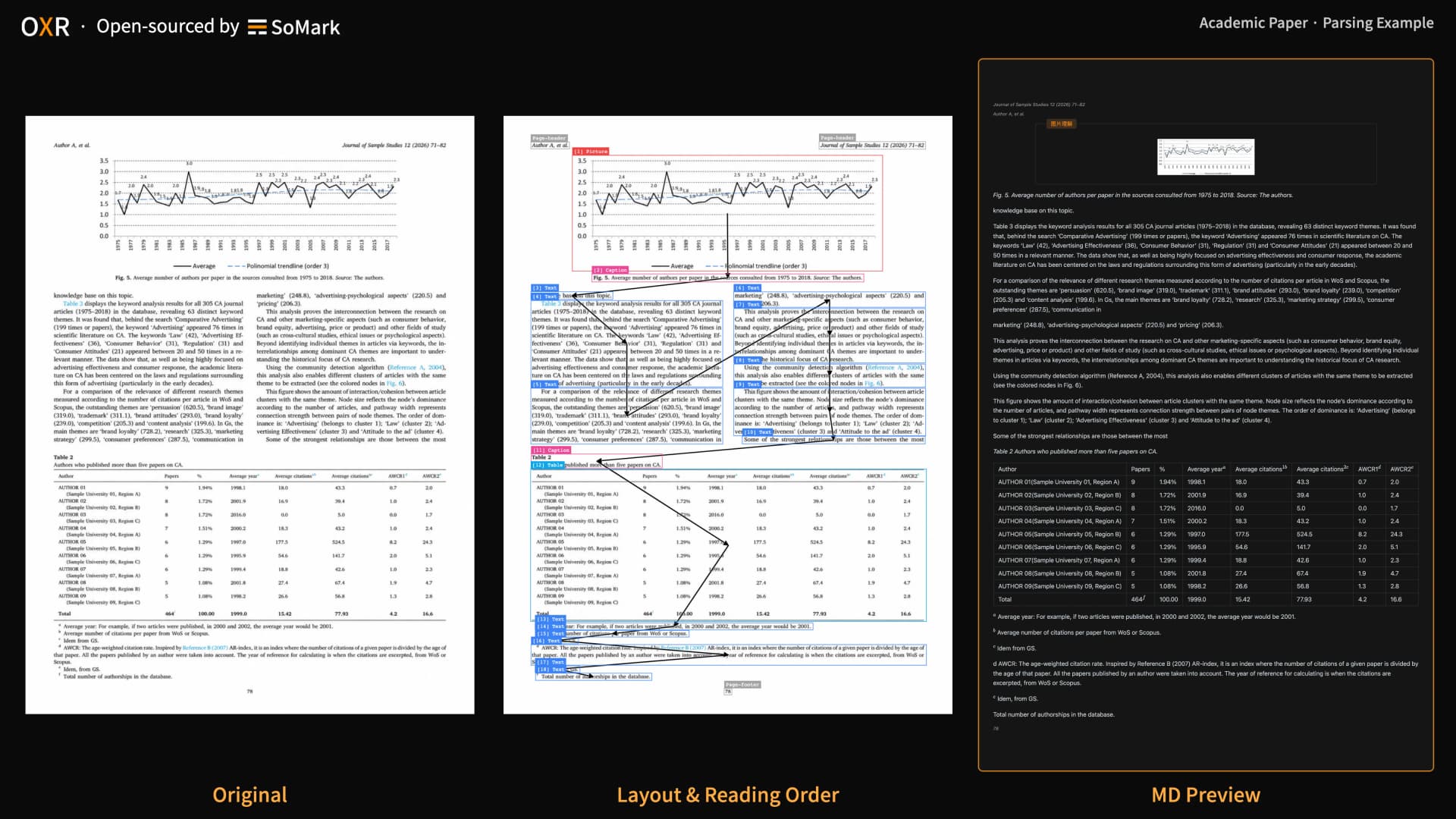
Typed elements give you natural chunk boundaries. Keep a table whole with its caption instead of splitting it at a token limit, attach footnotes to the paragraph they belong to, and index formulas as LaTeX so they stay searchable. The coordinates let you show users where on the page an answer came from.

Parsing an academic paper.
Moving from the free API to your own server
The free API is for testing. Requests are queued, and we do not guarantee stability, so do not build production on it. When you are ready, deploy OXR on your own GPU and change one flag:
somark --base-url http://localhost:8000/v1 --api-key dummy \
  parse document.pdf --formats md,json --out ./parsed-output/
The same CLI and SDKs (somark-py, somark-js) work against both.
How accurate is it?
In our comparison against published scores, OXR ranks first on olmOCR-Bench (87.84), OmniDocBench (97.18) and DocParsingBench (87.76). The full tables and evaluation setup are in the repo, so you can check the numbers. The better test is your own worst PDF.
- Online demo: https://free-oxr.somark.ai
- GitHub: https://github.com/SoMarkAI/OXR
- Weights: https://huggingface.co/SoMarkAI/OXR-1.0
License: custom Apache 2.0-based; commercial use is free below USD 2M in total funding or annual revenue.